Kali Linux Tool List

Kali Linux Tool List

Kali Linux Tool List

Tool Description
ABORT Tool Description
Algorithm::Diff Tool Description
a2disconf Tool Description
add-shell Tool Description
apache2ctl Tool Description
argz_delete Tool Description
asn1parse Tool Description
atk6-extract_hosts6 Tool Description
atk6-ndpexhaust6 Tool Description
a2dismod Tool Description
adduser Tool Description
apachectl Tool Description
argz_extract Tool Description
aspell Tool Description
atk6-extract_networks6 Tool Description
atk6-node_query6 Tool Description
a2dissite Tool Description
adduser.conf Tool Description
apparmor Tool Description
argz_insert Tool Description
aspell-autobuildhash Tool Description
atk6-fake_advertise6 Tool Description
atk6-parasite6 Tool Description
a2enconf Tool Description
adjtime Tool Description
apparmor.d Tool Description
argz_next Tool Description
aspell-import Tool Description
atk6-fake_dhcps6 Tool Description
atk6-passive_discovery6 Tool Description
a2enmod Tool Description
adjtime_config Tool Description
apparmor_parser Tool Description
argz_replace Tool Description
asprintf Tool Description
atk6-fake_dns6d Tool Description
atk6-randicmp6 Tool Description
a2ensite Tool Description
adjtimex Tool Description
apparmor_status Tool Description
argz_stringify Tool Description
assert Tool Description
atk6-fake_dnsupdate6 Tool Description
atk6-redir6 Tool Description
a2query Tool Description
afs_syscall Tool Description
apparmor.vim Tool Description
aria_chk Tool Description
assert_perror Tool Description
atk6-fake_mipv6 Tool Description
atk6-redirsniff6 Tool Description
a64l Tool Description
agetty Tool Description
applygnupgdefaults Tool Description
aria_dump_log Tool Description
astraceroute Tool Description
atk6-fake_mld26 Tool Description
atk6-rsmurf6 Tool Description
aa-enabled Tool Description
aio Tool Description
appres Tool Description
aria_ftdump Tool Description
asymmetric-key Tool Description
atk6-fake_mld6 Tool Description
atk6-sendpees6 Tool Description
aa-exec Tool Description
aio_cancel Tool Description
apropos Tool Description
aria_pack Tool Description
atan Tool Description
atk6-fake_mldrouter6 Tool Description
atk6-sendpeesmp6 Tool Description
aa-remove-unknown Tool Description
aio_error Tool Description
apt Tool Description
aria_read_log Tool Description
atan2 Tool Description
atk6-fake_pim6 Tool Description
atk6-smurf6 Tool Description
aa-status Tool Description
aio_fsync Tool Description
apt_auth.conf Tool Description
arj Tool Description
atan2f Tool Description
atk6-fake_router26 Tool Description
atk6-thcping6 Tool Description
aa-teardown Tool Description
aio_init Tool Description
apt-cache Tool Description
arjdisp Tool Description
atan2l Tool Description
atk6-fake_router6 Tool Description
atk6-thcsyn6 Tool Description
ab Tool Description
aio_read Tool Description
apt-cdrom Tool Description
arj-register Tool Description
atanf Tool Description
atk6-fake_solicitate6 Tool Description
atk6-toobig6 Tool Description
abort Tool Description
aio_return Tool Description
apt.conf Tool Description
arm_fadvise Tool Description
atanh Tool Description
atk6-firewall6 Tool Description
atk6-toobigsniff6 Tool Description
abs Tool Description
aio_suspend Tool Description
apt-config Tool Description
arm_fadvise64_64 Tool Description
atanhf Tool Description
atk6-flood_advertise6 Tool Description
atk6-trace6 Tool Description
accept Tool Description
aio_write Tool Description
apt-extracttemplates Tool Description
armscii-8 Tool Description
atanhl Tool Description
atk6-flood_dhcpc6 Tool Description
atmel_fwl Tool Description
accept4 Tool Description
airbase-ng Tool Description
apt-ftparchive Tool Description
arm_sync_file_range Tool Description
atanl Tool Description
atk6-flood_mld26 Tool Description
atobm Tool Description
access Tool Description
aircrack-ng Tool Description
apt-get Tool Description
arp Tool Description
atexit Tool Description
atk6-flood_mld6 Tool Description
atof Tool Description
access.conf Tool Description
airdecap-ng Tool Description
apt-key Tool Description
arpd Tool Description
atftpd Tool Description
atk6-flood_mldrouter6 Tool Description
atoi Tool Description
accessdb Tool Description
airdecloak-ng Tool Description
apt-listchanges Tool Description
arp-fingerprint Tool Description
ati Tool Description
atk6-flood_redir6 Tool Description
atol Tool Description
acct Tool Description
aireplay-ng Tool Description
apt-mark Tool Description
arping Tool Description
atk6-address6 Tool Description
atk6-flood_router26 Tool Description
atoll Tool Description
acl Tool Description
airmon-ng Tool Description
apt_preferences Tool Description
arp-scan Tool Description
atk6-alive6 Tool Description
atk6-flood_router6 Tool Description
atoq Tool Description
acos Tool Description
airodump-ng Tool Description
apt-secure Tool Description
arptables-nft Tool Description
atk6-connect6 Tool Description
atk6-flood_rs6 Tool Description
attr Tool Description
acosf Tool Description
airodump-ng-oui-update Tool Description
apt-sortpkgs Tool Description
arptables-nft-restore Tool Description
atk6-connsplit6 Tool Description
atk6-flood_solicitate6 Tool Description
attributes Tool Description
acosh Tool Description
airolib-ng Tool Description
apt-transport-http Tool Description
arptables-nft-save Tool Description
atk6-covert_send6 Tool Description
atk6-flood_unreach6 Tool Description
auth_destroy Tool Description
acoshf Tool Description
airserv-ng Tool Description
apt-transport-https Tool Description
as Tool Description
atk6-covert_send6d Tool Description
atk6-four2six Tool Description
authnone_create Tool Description
acoshl Tool Description
airtun-ng Tool Description
apt-transport-mirror Tool Description
as10k1 Tool Description
atk6-denial6 Tool Description
atk6-fragmentation6 Tool Description
authorized_keys Tool Description
acosl Tool Description
airventriloquist-ng Tool Description
ar Tool Description
ascii Tool Description
atk6-detect-new-ip6 Tool Description
atk6-fragrouter6 Tool Description
authunix_create Tool Description
acyclic Tool Description
alarm Tool Description
arch Tool Description
ascii-xfr Tool Description
atk6-detect_sniffer6 Tool Description
atk6-fuzz_dhcpc6 Tool Description
authunix_create_default Tool Description
addgnupghome Tool Description
aligned_alloc Tool Description
arch_prctl Tool Description
asctime Tool Description
atk6-dnsdict6 Tool Description
atk6-fuzz_dhcps6 Tool Description
autoexpect Tool Description
addgroup Tool Description
alloca Tool Description
argz Tool Description
asctime_r Tool Description
atk6-dnsrevenum6 Tool Description
atk6-fuzz_ip6 Tool Description
autopsy Tool Description
add_key Tool Description
alloc_hugepages Tool Description
argz_add Tool Description
asin Tool Description
atk6-dnssecwalk Tool Description
atk6-implementation6 Tool Description
avahi-daemon Tool Description
addmntent Tool Description
alphasort Tool Description
argz_add_sep Tool Description
asinf Tool Description
atk6-dos_mld Tool Description
atk6-implementation6d Tool Description
avahi-daemon.conf Tool Description
addpart Tool Description
amdgpu Tool Description
argz_append Tool Description
asinh Tool Description
atk6-dos-new-ip6 Tool Description
atk6-inject_alive6 Tool Description
avahi.hosts Tool Description
addr2line Tool Description
american-english Tool Description
argz_count Tool Description
asinhf Tool Description
atk6-dump_dhcp6 Tool Description
atk6-inverse_lookup6 Tool Description
avahi.service Tool Description
address_families Tool Description
androiddump Tool Description
argz_create Tool Description
asinhl Tool Description
atk6-dump_router6 Tool Description
atk6-kill_router6 Tool Description
awk Tool Description
addseverity Tool Description
apache2 Tool Description
argz_create_sep Tool Description
asinl Tool Description
atk6-exploit6 Tool Description
atk6-ndpexhaust26 Tool Description
axel Tool Description
ABORT Tool Description
Algorithm::Diff Tool Description
Algorithm::DiffOld Tool Description
Algorithm::Diff::XS Tool Description
Algorithm::Merge Tool Description
ALTER_AGGREGATE Tool Description
ALTER_COLLATION Tool Description
ALTER_CONVERSION Tool Description
ALTER_DATABASE Tool Description
ALTER_DEFAULT_PRIVILEGES Tool Description
ALTER_DOMAIN Tool Description
ALTER_EVENT_TRIGGER Tool Description
ALTER_EXTENSION Tool Description
ALTER_FOREIGN_DATA_WRAPPER Tool Description
ALTER_FOREIGN_TABLE Tool Description
ALTER_FUNCTION Tool Description
ALTER_GROUP Tool Description
ALTER_INDEX Tool Description
ALTER_LANGUAGE Tool Description
ALTER_LARGE_OBJECT Tool Description
ALTER_MATERIALIZED_VIEW Tool Description
ALTER_OPERATOR Tool Description
ALTER_OPERATOR_CLASS Tool Description
ALTER_OPERATOR_FAMILY Tool Description
ALTER_POLICY Tool Description
ALTER_PROCEDURE Tool Description
ALTER_PUBLICATION Tool Description
ALTER_ROLE Tool Description
ALTER_ROUTINE Tool Description
ALTER_RULE Tool Description
ALTER_SCHEMA Tool Description
ALTER_SEQUENCE Tool Description
ALTER_SERVER Tool Description
ALTER_STATISTICS Tool Description
ALTER_SUBSCRIPTION Tool Description
ALTER_SYSTEM Tool Description
ALTER_TABLE Tool Description
ALTER_TABLESPACE Tool Description
ALTER_TEXT_SEARCH_CONFIGURATION Tool Description
ALTER_TEXT_SEARCH_DICTIONARY Tool Description
ALTER_TEXT_SEARCH_PARSER Tool Description
ALTER_TEXT_SEARCH_TEMPLATE Tool Description
ALTER_TRIGGER Tool Description
ALTER_TYPE Tool Description
ALTER_USER Tool Description
ALTER_USER_MAPPING Tool Description
ALTER_VIEW Tool Description
ANALYZE Tool Description
Authen::SASL Tool Description
Authen::SASL::Perl Tool Description
Authen::SASL::Perl::ANONYMOUS Tool Description
Authen::SASL::Perl::CRAM_MD5 Tool Description
Authen::SASL::Perl::DIGEST_MD5 Tool Description
Authen::SASL::Perl::EXTERNAL Tool Description
Authen::SASL::Perl::GSSAPI Tool Description
Authen::SASL::Perl::LOGIN Tool Description
Authen::SASL::Perl::PLAIN Tool Description
How To Create A Custom Password List

How To Create A Custom Password List

How To Create A Custom Password List


In Hacking, We need to get a password list every service has password protected. Just like Facebook Instagram Twitter and more website's protected by a password. So we need to create a Custom Password list or Wordlist.

So! Today we are learning How to Create Custom Wordlist or Password list we use Cupp for creating a custom Password list by cupp.

I'm Use Kali Linux os for doing this task for first we need to install cupp on Kali Linux

1. Clone Cupp

Open your terminal and clone cupp tool on Kali Linux
Type: git clone https://github.com/Mebus/cupp.git

    root@kali:~# git clone https://github.com/Mebus/cupp.git
    Cloning into 'cupp'...
    remote: Enumerating objects: 194, done.
    remote: Total 194 (delta 0), reused 0 (delta 0), pack-reused 194
    Receiving objects: 100% (194/194), 99.99 KiB | 259.00 KiB/s, done.
    Resolving deltas: 100% (103/103), done.
    root@kali:~#
    

2. You Get 6 File in Cupp Folder

For Chack All files in cupp directory simply open Cupp path on Terminal and type
Type: ls -l

    root@kali:~/cupp# ls -l
    total 88
    -rw-r--r-- 1 root root   760 agd 16 21:03 CHANGELOG.md
    -rw-r--r-- 1 root root  1642 agd 16 21:03 cupp.cfg
    -rwxr-xr-x 1 root root 33337 agd 16 21:03 cupp.py
    -rw-r--r-- 1 root root 32472 agd 16 21:03 LICENSE
    -rw-r--r-- 1 root root  3670 agd 16 21:03 README.md
    -rwxr-xr-x 1 root root  4435 agd 16 21:03 test_cupp.py
    root@kali:~/cupp# 
    
    
In 6 file the cupp.py is main file we need to stat it

3. Start Cupp.py

Now we need to Start Cupp.py  by python3 I'm using Python3.7 for run Cupp.py
Type: python2 cupp.py 

    root@kali:~/cupp# python3 cupp.py 
     ___________ 
       cupp.py!                 # Common
          \                     # User
           \   ,__,             # Passwords
            \  (oo)____         # Profiler
               (__)    )\   
                  ||--|| *      [ Muris Kurgas | j0rgan@remote-exploit.org ]
                                [ Mebus | https://github.com/Mebus/]
    
    usage: cupp.py [-h] [-i | -w FILENAME | -l | -a | -v] [-q]
    
    Common User Passwords Profiler
    
    optional arguments:
      -h, --help         show this help message and exit
      -i, --interactive  Interactive questions for user password profiling
      -w FILENAME        Use this option to improve existing dictionary, or WyD.pl
                         output to make some pan sauce
      -l                 Download huge wordlists from repository
      -a                 Parse default usernames and passwords directly from
                         Alecto DB. Project Alecto uses purified databases of
                         Phenolic and CIRT which were merged and enhanced
      -v, --version      Show the version of this program.
      -q, --quiet        Quiet mode (don't print banner)
    root@kali:~/cupp# 


4. Create Custom Password list by  -I Option arguments

Type: Python3 cupp.py -i

    root@kali:~/cupp# python3 cupp.py -i
     ___________ 
       cupp.py!                 # Common
          \                     # User
           \   ,__,             # Passwords
            \  (oo)____         # Profiler
               (__)    )\   
                  ||--|| *      [ Muris Kurgas | j0rgan@remote-exploit.org ]
                                [ Mebus | https://github.com/Mebus/]
    
    
    [+] Insert the information about the victim to make a dictionary
    [+] If you don't know all the info, just hit enter when asked! ;)
    
    > First Name: Viaksh
    > Surname: singh
    > Nickname: Vicky
    > Birthdate (DDMMYYYY): 10102002
    
    
    > Partners) name: vishu
    > Partners) nickname: vishu
    > Partners) birthdate (DDMMYYYY): 29052002
    
    
    > Child's name: happy
    > Child's nickname: happy
    > Child's birthdate (DDMMYYYY): 11111111
    
    
    > Pet's name: ciku
    > Company name: Tashinva
    
    
    > Do you want to add some key words about the victim? Y/[N]: y
    > Please enter the words, separated by comma. [i.e. hacker,juice,black], spaces will be removed: y
    > Do you want to add special chars at the end of words? Y/[N]: y
    > Do you want to add some random numbers at the end of words? Y/[N]:y
    > Leet mode? (i.e. leet = 1337) Y/[N]: y
    
    [+] Now making a dictionary...
    [+] Sorting list and removing duplicates...
    [+] Saving dictionary to viaksh.txt, counting 28210 words.
    [+] Now load your pistolero with viaksh.txt and shoot! Good luck!
    root@kali:~/cupp# 


5. More Options

Optional arguments: Use this all options by
Type: python3 cupp.py {Option}
  1. -h→ show this help message and exit
  2. -i→Interactive questions for user password profiling
  3. -w→Use this option to improve existing dictionary, or WyD.pl output to make some pan sauce
  4. -l→Download huge wordlists from repository
  5. -a→Parse default usernames and passwords directly from Alecto DB. Project Alecto uses purified databases of Phenoelit and CIRT which were merged and enhanced
  6. -v→Show the version of this program.
  7. -q→Quiet mode (don't print banner)

I hope this it helpful for you thank you for read

WHAT IS PASSIVE AND ACTIVE ATTACK

WHAT IS PASSIVE & ACTIVE ATTACK

About Attacks

When you take a look into the mind of a hacker, you may realize that there are two types of hackers that you are bound to encounter – the passive and the active one. Knowing the types of attacks that they do will allow you to prepare yourself to defend the system that you are trying to protect by installing the right security protocol.

WHAT IS PASSIVE AND ACTIVE ATTACK

What is a Passive Attack

A passive attack is an attack wherein the hacker waits for the perfect opportunity to penetrate your system. This type of attack is typically done in order for a hacker to observe your networking structure, the type of software you use, or any security measures that you have already installed.

passive attacks typically happen when a hacker monitors possible system vulnerabilities without making any changes to the data that he targets. You can think of this attack as a hacker’s means of researching his target in order to launch a more effective attack.

Passive attacks are classified into:

1. Active reconnaissance
This happens when an intruder listens right into a targeted system by engaging the target to find out where weak points are. This is typically done through port scanning, which is an effective tactic to find out where the vulnerable ports are located and what type of data they normally host. After discovering the vulnerability, a hacker may engage this weak point and exploit the services that are associated with them.

2. Passive reconnaissance
his happens when a hacker chooses to study the targeted system without actively engaging it, without the intention of directly engaging the target. Passive reconnaissance tactics include wardriving (discovery of unprotected wireless network), dumpster diving (finding data on discarded devices or documents), or masquerading (pretending to be a network user with authorization).

These two tactics can be essential tools when it comes to discovering vulnerabilities in your computer system to enable you to prevent any further attacks. Once you are able to use reconnaissance tactics, you can easily map out where the weak points of your computer system really are.

Once you are able to identify vulnerable points through the use of test reconnaissance attacks, you will realize that the simplest and best way to protect your computer system from snooping is to install an IPS (intrusion prevention system), which will serve as your safeguard from port scans and your automated method of shutting down any attempts of a port scan before an intruder gets a complete map of your network. At the same time, you can also install a good firewall that will control the visibility of your network’s ports.

What is an Active Attack

An active attack is a direct exploit on a targeted network, in which a hacker aims to create data changes or create data that will attach itself to the target to make further exploits.

Active attacks are typically classified into the following:

1. Masquerade attack
In this attack, a hacker pretends to be a legitimate user of the network in order to gain deeper access or better authorization. A hacker typically does this by using hacked user IDs and passwords, bypassing an authentication system, or exploiting discovered security flaws

Once a hacker becomes successful in infiltrating the system with the identity that he pretends to have, they can easily make changes or delete any software or file, and even kick out authorized users on a network. They can also make modifications to the network and router settings, which may allow them to gain access to the.

2. Session replay
In this attack, a hacker makes use of a stolen session ID in order to create an automatic authentication the next time the target accesses a particular website. This attack exploits the web's nature of storing forms, cookies, and URLs on a browser. Once the hacker gets the data used by a particular session ID on a targeted website, he can then proceed to a session replay attack, which allows him to do everything that the legitimate user of the ID can do.

Since session replay attacks do not happen in real-time, this attack is typically discovered once the legitimate user finds discrepancies on his account. Most of the time, victims of a session replay attack only discover that their accounts have been compromised when identity theft already occurred.

3. Denial of Service (DoS) and Distributed Denial of Service (DDoS)
A DoS attack is defined as the denial of access or service to a legitimate user – you can see that all services that are running on your computer are slowing down or quit suddenly as you use them. DDoS attack, on the other hand, involves a larger number of systems that have been previously compromised by a hacker to attack a particular target

While DoS and DDoS attacks are not used to destroy a target’s security system or to steal data, it can be used to generate profit loss or to render a computer system entirely useless while it is being used. Usually, these attacks are made to create a temporary loss in connectivity on a network and deny all related services. In certain occasions, these attacks can also work to destroy certain files and programs on a targeted computer

A DoS or a DDoS attack is very similar to having a slow internet connection and a slow computer at the same time. During such an attack, you may feel that your network’s performance is unusually slow and you cannot access any website. At the same time, it is also relatively easy to find out if you are being targeted for an attack – you may see that you are receiving too much spam or other signs of unusual traffic.

Now that you have an idea on the types of attacks that a hacker may launch, it’s time for you to learn how a hacker can launch them and prepare yourself to do countermeasures

Who is Hacks | Types of Hacker

Who is Hacks | Types of Hacker

Who is Hacks | Types of Hacker

What is Hacking 👀👁🤪

Whenever you encounter the word hacking, you probably associate it with sending an encrypted program to another user and then being able to get unauthorized access on a remote computer

However, the term hacking was used to define any act of tinkering a computer’s hardware or software other than its intended use,  in order to improve it and find out how electronic devices can work electronically.

While that definition technically still holds true, hacking has definitely made a whole new turn especially when it comes to how another person can access someone else’s computer. Before you think that hacking is all about getting past securities to wreak havoc on somebody else’s digital device, you might need to know the types of hackers that exist nowadays

Who is Hacker 💂

We have any defenses of hacker just like

A security hacker is someone who explores methods for breaching defenses and exploiting weaknesses in a computer system or network
A Hacker is a person who finds and exploits the weakness in computer systems and/or networks to gain access. Hackers are usually skilled computer programmers with knowledge of computer security.

According to me Hacker finding the same problem in Program System and hack it means get has control over this program and start controlling.

If He uses it for Good work and informs to honer of the program about bug We can say him White Had Hacker & Ethical hacker. Just like me 😎😎😎

And if He can't tel anyone and do misuse of this program we can say him Black Had Hacker 😈😈😈

Types of Hacker 👀

In the world, many types of hacker are available
Hackers are typically divided into the following categories

Black Hat Hackers 👽

Also known as criminal hackers or crackers, these people are those that maliciously gain access to another person's system for selfish gain. They typically hack electronic devices and modify, steal, or delete critical files for their personal gain.

White Hat Hackers 👮

White hat hackers, or ethical hackers, discover ways on how a device’s system can be exploited in order to learn how people can defend themselves against possible attacks. These ethical hackers also make it a point that the security services they issue are updated. They do this by being on the lookout and actively digging for the newest exploits and new system vulnerabilities.

Ethical hackers also make it a point that they discover new ways to learn how an electronic device can be tinkered with to maximize its efficiency. For this reason, they build communities that allow them to crowd-source their knowledge in order to improve the way people use their devices.

Grey hat hackers 🙈🙉🙊

As the name suggests, they are driven by white and black hat hacking motivations – they are the ones who employ both illegal and legal techniques to exploit or improve a system. However, if a grey hat hacker exploits another person’s system, he typically makes it a point to inform the owner of the exploits made and then offers suggestions on what can be done to buff up system security. Once you are able to identify the hackers that you are likely to encounter, you will be able to know the motivation that they have for hacking and the types of hacks that they are likely to come up with.

I Hope It's Helpful for you

Thank You Ji😴😴😉😉

Unable to locate package - Solved

Unable to locate package - Solved

Unable to locate package - Solved

Kali Linux has a problem "Unable to locate package".
When we use "apt-get install xxx" for install any program and tool kali Linux showing error  "Unable to locate package"
when over OS is not updated So  this message shows us

How to Solve Unable to locate package

It's a very essay to solve follow these steps to fix this problem
Unable to locate package - Solved

Step 1 Open terminal

Simply open your kali Linux Terminal and type following Command
"apt-get update"
This command updates your OS very essay

Step 2. Upgrade You kali Linux

Now type "apt-get upgrade"
this command upgrade your Kali Linux

Step 3. Edit Sources.list

This list is the main reason to show this error in Kali Linux.
In this step, we are update "sources.list" by input the same new code and same new links
Take a backup of sources.list if you do any mistake in sources.list update you replace it again with secure

Follow these steps for update sources.list

Step 1.backup sources.list

We are got this list on ["/etc/apt/"].
Open terminal and type
"cp   /etc/apt/sources.list  /root/Desktop"
This command copy sources.list on your Desktop.
If you have any problem in command SO open File manager and visit on this path [  /etc/apt/  ] and copy "sources.list" on Desktop

Step 2. Open sources.list for edit

Simple Open sources.list in any Text editor and Remove all txt a paste new txt in sources.list
new text give bellow
[deb http://http.kali.org/kali kali-rolling main contrib non-free # For source package access, uncomment the following line # deb-src http://http.kali.org/kali kali-rolling main contrib non-free deb http://http.kali.org/kali sana main non-free contrib deb http://security.kali.org/kali-security sana/updates main contrib non-free # For source package access, uncomment the following line # deb-src http://http.kali.org/kali sana main non-free contrib # deb-src http://security.kali.org/kali-security sana/updates main contrib non-free deb http://old.kali.org/kali moto main non-free contrib # For source package access, uncomment the following line # deb-src http://old.kali.org/kali moto main non-free contrib]

 Copy this and past in sources.list and save it.

Step 3. update and upgrade your system again

open terminal and
"apt-get update"
and
"apt-get upgrade 

Step 4.  Reboot your system

now Restart your kali Linux OS.

Now if you got any problem share me by command and if you have any suggest command and share your problem solved and not

Thank You So Mush JI

How to Install All Language Fonts in Kali Linux

How to Install All Language Fonts in Kali Linux

How to Install All Language Fonts in Kali Linux

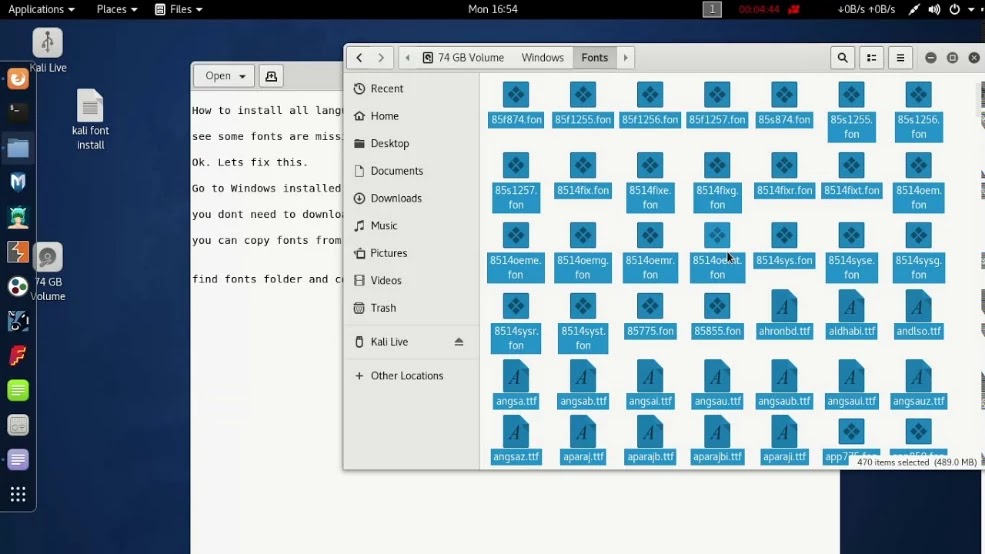
The New kali Linux update has the same font problem just only the English language is available to read and write just like Hindi and other languages font create same boxes just like showing in the picture.

When I Searched Hindi Poem on kali Linux it's showing me this result.

Kali Linux Font Problem in hindi


So Install Font 

How to add non-root user on kali linux

 How to add non-root user on kali linux
 How to add non-root user on Kali Linux

How to add non-root user on Kali Linux

Intro.

In this tutorial, we are learning How to add non-root users on Kali Linux. So we're use adduser Tool. This tool comes on all OS as a pre-Install. It's very essay to use this tool

About the "Adduser Tool"

This tool simply use to add a user or group to the system.
adduser and addgroup add users and groups to the system according to command-line options and configuration information in /etc/adduser.conf. They are friendlier front ends to the low-level tools like useradd, groupadd and usermod programs, by default choosing Debian policy conformant UID and GID values, creating a home directory with skeletal configuration, running a custom script, and other features. adduser and addgroup can be run in one of five modes:


  • Add a normal user
  • Add a normal user
  • Add a normal user
  • Add a system group
  • Add an existing user to an existing group

  • Add user on Kali Linux

    So How to add non-root users on Kali Linux. Simply follow my all steps and commends.


    Step 1.

    Open Your Kali Linux terminal and type following command

    Type: man abuser
     
    This commend show you more options and give you more knowledge

    Step 2. Open terminal

    Open your Kali Linux terminal and type "adduser --home /(user name) (retype user name)" 
     
    In my case, I create vksingh user on Kali Linux so my commend is "adduser --home /vksingh vksingh" and hit enter

     How to add non-root user on kali linux
    "adduser --home /(user name) (retype user name)"

    Step 3. Type Password

    After type commend it's asking password so type a strong password and different to user name

    New Password:*******
    Retype New Password:******

     How to add non-root user on kali linux

    Type Password


    Step 4. Changing the user information for your User

    After the successfully updated password Fill Some more useful information for your user

    Hit Enter for Skip any Information

    Full Name:
    Room Number:
    Work Number:
    Home Number:
    Other:


    Step 5.

    In this step, it's asking you for "Is the information correct? [Y/n]

    Y: y use for Yes it means all information correct

    N: n use for No it means all information is not correct 

    So type y and hit enter

     How to add non-root user on kali linux
    Type Y for yes

    Step 6. Check all user-id

    After the create a user id. and you want to confirm the user is created and not. Two Method we have to check it

    First Method for check user-created and Not

    Simple Click on log out button and click on "Switch user" and type your new user name and type your new password and hit enter

    Second Method for check user-created and Not

    Open terminal and type "Sudo apt-get update " and hit enter
    Now type "users" and hit Enter. and all user show on your terminal screen just like showing on the picture

     How to add non-root user on kali linux
    Type: users

    If you have any problem comment on your problem. I try to solve your problem very soon and give a reply very fast


    Thank You

    4 Ways to Crack a Facebook Password & How to Protect Yourself from Them


     4 Ways to Crack a Facebook Password & How to Protect Yourself from Them


    Despite the security concerns that have plagued Facebook for years, most people are sticking around and new members keep on joining. This has led Facebook to break records numbers with over 1.94 billion monthly active users, as of March 2017 — and around 1.28 billion daily active users.

    We share our lives on Facebook. We share our birthdays and our anniversaries. We share our vacation plans and locations. We share the births of our sons and the deaths of our fathers. We share our most cherished moments and our most painful thoughts. We divulge every aspect of our lives. Clinical psychologists have written entire books detailing the surprisingly extensive impact Facebook has on our emotions and relationships

    But we sometimes forget who's watching.

    We use Facebook as a tool to connect, but there are those people who use that connectivity for malicious purposes. We reveal what others can use against us. They know when we're not home and for how long we're gone. They know the answers to our security questions. People can practically steal our identities — and that's just with the visible information we purposely give away through our public Facebook profile.

    The scariest part is that as we get more comfortable with advances in technology, we actually become more susceptible to hacking. As if we haven't already done enough to aid hackers in their quest for our data by sharing publicly, those in the know can get into our emails and Facebook accounts to steal every other part of our lives that we intended to keep away from prying eyes.

    In fact, you don't even have to be a professional hacker to get into someone's Facebook account.

    It can be as easy as running Firesheep on your computer for a few minutes. In fact, Facebook actually allows people to get into someone else's Facebook account without knowing their password. All you have to do is choose three friends to send a code to. You type in the three codes, and voilà — you're into the account. It's as easy as that.In this article I'll show you these, and a couple other ways that hackers (and even regular folks) can hack into someone's Facebook account. But don't worry, I'll also show you how to prevent it from happening to you.

    Method 1Reset the Password


    The easiest way to "hack" into someone's Facebook is through resetting the password. This could be easier done by people who are friends with the person they're trying to hack.

    The first step would be to get your friend's Facebook email login. If you don't already know it, try looking on their Facebook page in the Contact Info section. Still stuck? Hackers use scraping tools like TheHarvester to mine for email addresses, so check out our guide here to find a user's email that you don't already know.
    Next, click on Forgotten your password? and type in the victim's email. Their account should come up. Click This is my account.

    It will ask if you would like to reset the password via the victim's emails. This doesn't help, so press No longer have access to these?

    It will now ask How can we reach you? Type in an email that you have that also isn't linked to any other Facebook account.

    It will now ask you a question. If you're close friends with the victim, that's great. If you don't know too much about them, make an educated guess. If you figure it out, you can change the password. Now you have to wait 24 hours to login to their account.

    If you don't figure out the question, you can click on Recover your account with help from friends. This allows you to choose between three and five friends.


    It will send them passwords, which you may ask them for, and then type into the next page. You can either create three to five fake Facebook accounts and add your friend (especially if they just add anyone), or you can choose three to five close friends of yours that would be willing to give you the password.

    How to Protect Yourself

    Use an email address specifically for your Facebook and don't put that email address on your profile.

    When choosing a security question and answer, make it difficult. Make it so that no one can figure it out by simply going through your Facebook. No pet names, no anniversaries — not even third grade teacher's names. It's as easy as looking through a yearbook.

    Learn about recovering your account from friends. You can select the three friends you want the password sent to. That way you can protect yourself from a friend and other mutual friends ganging up on you to get into your account.Method 2Use a Keylogger
    Software Keylogger
    A
    software keylogger is a program that can record each stroke on the keyboard that the user makes, most often without their knowledge. The software has to be downloaded manually on the victim's computer. It will automatically start capturing keystrokes as soon as the computer is turned on and remain undetected in the background. The software can be programmed to send you a summary of all the keystrokes via email.
    Null Byte features an excellent guide on how to get a keylogger on a target computer to get you started. If this isn't what you're looking for, you can search for free keyloggers or try coding a basic keylogger yourself in C++.


    Hardware Keylogger
    These work the same way as the software keylogger, except that a USB drive with the software needs to be connected to the victim's computer. The USB drive will save a summary of the keystrokes, so it's as simple as plugging it to your own computer and extracting the data.
    There are several options available for hardware keyloggers. Wired keyloggers like the Keyllama can be attached to the victim's computer to save keystrokes and works on any operating system — provided you have physical access to retrieve the device later. If you're looking to swipe the passwords remotely, you can invest in a premium Wi-Fi enabled keylogger which can email captured keystrokes or be accessed remotely over Wi-Fi.


    How to Protect Yourself
    Use a firewall. Keyloggers usually send information through the internet, so a firewall will monitor your computer's online activity and sniff out anything suspicious.
    Install a password manager. Keyloggers can't steal what you don't type. Password mangers automatically fill out important forms without you having to type anything in.
    Update your software. Once a company knows of any exploits in their software, they work on an update. Stay behind and you could be susceptible.
    Change passwords. If you still don't feel protected, you can change your password bi-weekly. It may seem drastic, but it renders any information a hacker stole uselessness


    Method 3Phishing
    This option is much more difficult than the rest, but it is also the most common method to hack someone's account. The most popular type of phishing involves creating a fake login page. The page can be sent via email to your victim and will look exactly like the Facebook login page. If the victim logs in, the information will be sent to you instead of to Facebook. This process is difficult because you will need to create a web hosting account and a fake login page.


    The easiest way to do this would be to follow our guide on how to clone a website to make an exact copy of the facebook login page. Then you'll just need to tweak the submit form to copy / store / email the login details a victim enters. If you need help with the exact steps, there are detailed instructions available by Alex Long here on Null Byte. Users are very careful now with logging into Facebook through other links, though, and email phishing filters are getting better every day, so that only adds to this already difficult process. But, it's still possible, especially if you clone the entire Facebook website.
    How to Protect Yourself
    Don't click on links through email. If an email tells you to login to Facebook through a link, be wary. First check the URL (Here's a great guide on what to look out for). If you're still doubtful, go directly to the main website and login the way you usually do.
    Phishing isn't only done through email. It can be any link on any website / chat room / text message / etc. Even ads that pop up can be malicious. Don't click on any sketchy looking links that ask for your information.
    Use anti-virus & web security software, like Norton or McAfee.Method 4Man in the Middle Attack
    If you can get close to your target, you can trick them into connecting to a fake Wi-Fi network to steal credentials via a Man In The Middle (MITM) attack. Tools like the Wi-Fi Pumpkin make creating a fake Wi-Fi network is as easy as sticking a $16 Wireless Network Adapter on the $35 Raspberry Pi and getting close to your target. Once the victim connects to your fake network, you can inspect the traffic or route them to fake login pages. You can even set it to only replace certain pages and leave other pages alone.


    This little computer can create an evil AP - a cloned wireless network to trick the user into connecting so you can listen in on their traffic.

    How to Protect Yourself
    Don't connect to any open (unencrypted) Wi-Fi Networks.
    Especially don't connect to any Wi-Fi networks that are out of place. Why might you see a "Google Starbucks" when there's no Starbucks for miles? Because hackers know your phone or computer will automatically connect to it if you have used a network with the same name before.
    If you have trouble connecting to your Wi-Fi, look at your list of nearby networks to see if there are any copies of your network name nearby.
    If your router asks you to enter the password for a firmware update to enable the internet or shows you a page with major spelling or grammar errors, it is likely you're connected to a fake hotspot and someone nearby is trying to steal your credentials.A Couple More Facebook Hacks
    For those with a bit more technical skill, check out the Same Origin Policy Facebook hack and the somewhat easier, Facebook Password Extractor. We will continue add more Facebook hacks in the near future, so keep coming back here.
    How to Protect Yourself
    On Facebook, go to your Account Settings and check under Security. Make sure Secure Browsing is enabled. Firesheep can't sniff out cookies over encrypted connections like HTTPS, so try to steer away from HTTP.
    Full time SSL. Use Firefox add-ons such as HTTPS-Everywhere or Force-TLS.
    Log off a website when you're done. Firesheep can't stay logged in to your account if you log off.
    Use only trustworthy Wi-Fi networks. A hacker can be sitting across from you at Starbucks and looking through your email without you knowing it.
    Use a VPN. These protect against any sidejacking from the same WiFi network, no matter what website you're on as all your network traffic will be encrypted all the way to your VPN provider.Protecting Yourself: Less Is More
    Social networking websites are great ways to stay connected with old friends and meet new people. Creating an event, sending a birthday greeting and telling your parents you love them are all a couple of clicks away.
    Facebook isn't something you need to steer away from, but you do need to be aware of your surroundings and make smart decisions about what you put up on your profile. The less information you give out on Facebook for everyone to see, the more difficult you make it for hackers.
    If your Facebook account ever gets hacked, check out our guide on getting your hacked Facebook account back for information on restoring your account.
    Bonus: If you're interested in who's checking you out, there are some ways you can (kindof) track who's viewed your Facebook profile.
    More Password-Hacking Guides
    For more info on cracking passwords, check out our guides on hacking Linux passwords, hacking Windows passwords, and our super-easy beginner's guide on hacking Wi-Fi passwords (or for newer wireless routers, how to crack WPA2-PSK wifi passwords).


    Automate Wi-Fi Hacking with Wifite2


     Automate Wi-Fi Hacking with Wifite2 


    There are many ways to attack a Wi-Fi network. The type of encryption, manufacturer settings, and the number of clients connected all dictate how easy a target is to attack and what method would work best. Wifite2 is a powerful tool that automates Wi-Fi hacking, allowing you to select targets in range and let the script choose the best strategy for each network.

    Wifite2 vs. Wifite

    Wifite has been around for some time and was one of the first Wi-Fi hacking tools I was introduced to. Along with Beside-ng, automated Wi-Fi hacking scripts enabled even script kiddies to have a significant effect without knowing much about the way the script worked. Compared to Beside-ng, the original Wifite was very thorough in using all available tools to attack a network, but it could also be very slow.


    One of the best features of the original Wifite was the fact that it performed a Wi-Fi site survey before attacking nearby networks, allowing a hacker to easily designate one, some, or all nearby networks as targets. By laying out available targets in an easy to understand format, even a beginner could understand what attacks might work best against nearby networks.

    The original Wifite would automatically attack WPA networks by attempting to capture a handshake or by using the Reaver tool to brute-force the WPS setup PIN of nearby networks. While this method was effective, it could prove to take 8 hours or more to complete.

    The updated WiFite2 is much faster, churning through attacks in less time and relying on more refined tactics than the previous version. Because of this, Wifite2 is a more serious and powerful Wi-Fi hacking tool than the original Wifite.

    Attack Flow for Wi-Fi Hacking Wifite2 follows a simple but effective workflow for hacking nearby networks as rapidly as possible. To do so, it pushes each tactic it tries to the practical limit, even going to far as to try to crack any handshakes it retrieves

    • How to make sure you like to make
    • How to make sure you like to make
    • How to make sure you like to make
    1. How to make sure you like to make
    2. How to make sure you like to make
    3. How to make sure you like to make

    In the first step,

    Wifite2 scans across all channels looking for any network in range. It ranks these networks it discovers by signal strength, as a network being detected does not ensure you can reliably communicate with it. 

    Organized from strongest to weakest signal strength, the reconnaissance phase involves gathering information about what networks are around and which hacking techniques they might be vulnerable to. Because of the way Wifite2 is organized, it's easy to add a directional Wi-Fi antenna to use Wifite2 to locate the source of any nearby Wi-Fi network while performing a site survey

    After the site survey is complete, any targets displayed will show whether there are clients connected, whether the network advertises WPS, and what kind of encryption the network is using. Based on this, an attacker can select any target, a group of targets or all targets to begin an attack based on the information gathered.

    Wifite2 will progress through the target list starting with the fastest and easiest attacks, like WPS-Pixie, which can result in a password being breached in seconds, on to less sure tactics like checking for weak passwords with a dictionary attack. If an attack fails or takes too long, Wifite2 will move on to the next applicable attack without wasting hours like its predecessor was prone to doing.

    What You'll Need To get started, you'll need a Wi-Fi network adapter. You can put it into wireless monitor mode. This means selecting one that is compatible with Kali Linux, which we have several excellent guides on doing.

    Wifite2

    is installed by default on Kali Linux, so I recommend you either use Kali in a virtual machine or dual-booted on a laptop. You can use Wifite2 on other Linux systems, but I won't go through the installation as this guide assumes you're using Kali Linux.

    If you have any suggestion for our post/Website Please Comment
    If You get any problem share your problem with us 

    Thank You

    Hack wifi by aircrack-ng part 2


    How to Hack WPA WPS WiFi On Kali Linux

    Intro.

    Aircraqck-ng is free tool is't using for crack/Hack WPA WPS Wi-Fi Caputur file by password list. Today we are hack a wifi by aricrack-ng Tool on kali linux. Every one know that the kali linux use for hacking and pentesting. Kali linux Second Name is Hackers OS.

    So Today we are hack a wifi on kali linux using aircrack-ng.

    The many tool are avaible for hack wifi. All tool are free to use.

    WiFi Hacking Tools On kali Linux

    • aircrack-ng
    • Fern-Wifi-Cracke
    •  Wifite 
    •  Wifiphiser
    • phisere

    Start WiFi Hacking by aircrack-ng on Kali-Linux

    Requerment For Hack any WiFi

    Two Requerment have to hack any wifi
    1. First Requerment is you need Wordlist/Password list.
    2. Miniman One Divise conneted to targeted WiFi


    Follow my steps to Hack And Crack wifi


    Step 1

    Step. 1

    Login Kali-Linux OS as root and Open Terminal.

    Step 2

    Step. 2


    Now We are use [airmon-ng start wlan0] for see "wireless Adepter mode" and start hacking.

    Step 3

    Step. 3

    In this step we are see who and which WiFi are avaible near by us. Type Following Command [airodump-ng wlan0mon] and hit Enter


    Step 4

    Step. 4

    Ctrl + C for type new command

    Step 5

    Step. 5

    airodump-ng --bssid (type bssid of wifi) --channel (type Channel Number of wifi) wlan0mon -w (give a path for save 5 capture file)


    Step 6

    Step. 6

    New window Tyep [aireplay-ng -0 0 -a (bssid of wifi) wlan0mon ]

    Step 7

    Step. 7

    Check WPA Handshack file captured and not.

    Step 8


    Step. 8

    aircrack-ng -w (Password list path) (.Cap file path)

    Step 9

    Step. 9

    airmon-ng stop wlan0mon

    Post Finished

    If You Get any problem commant and share your problem with us